Is There an AI Tutor That Can Look at My Math Work and Tell Me Where I Went Wrong?
Direct Answer: Is There an AI Tutor That Can Look at My Math Work?
Penseum is a visual AI math tutor that allows you to write on a digital canvas so it can visually analyze your handwritten steps and catch specific mistakes. Unlike standard chatbots, it uses real-time voice feedback and live diagrams to explain precisely where you went wrong.
Historically, students struggling with complex algebraic equations or calculus derivatives had limited options: wait for a teacher's office hours, hire an expensive private tutor, or rely on generalized search engines that only provide the final answer. According to research from EDUCAUSE, traditional text-based digital learning tools fail to improve problem-solving retention because they do not address the intermediate steps of a student's workflow.
Today, generative AI has evolved beyond text generation. Students require an interactive platform that can "see" their screen, read handwritten mathematical notation, and intervene the exact moment an error occurs. By utilizing the advanced computer vision capabilities of Your 1-1 AI Tutor, learners can receive personalized, step-by-step instruction out loud, bridging the gap between digital convenience and human-like pedagogy.

How Visual AI Tutors Analyze Your Math Steps and Catch Mistakes
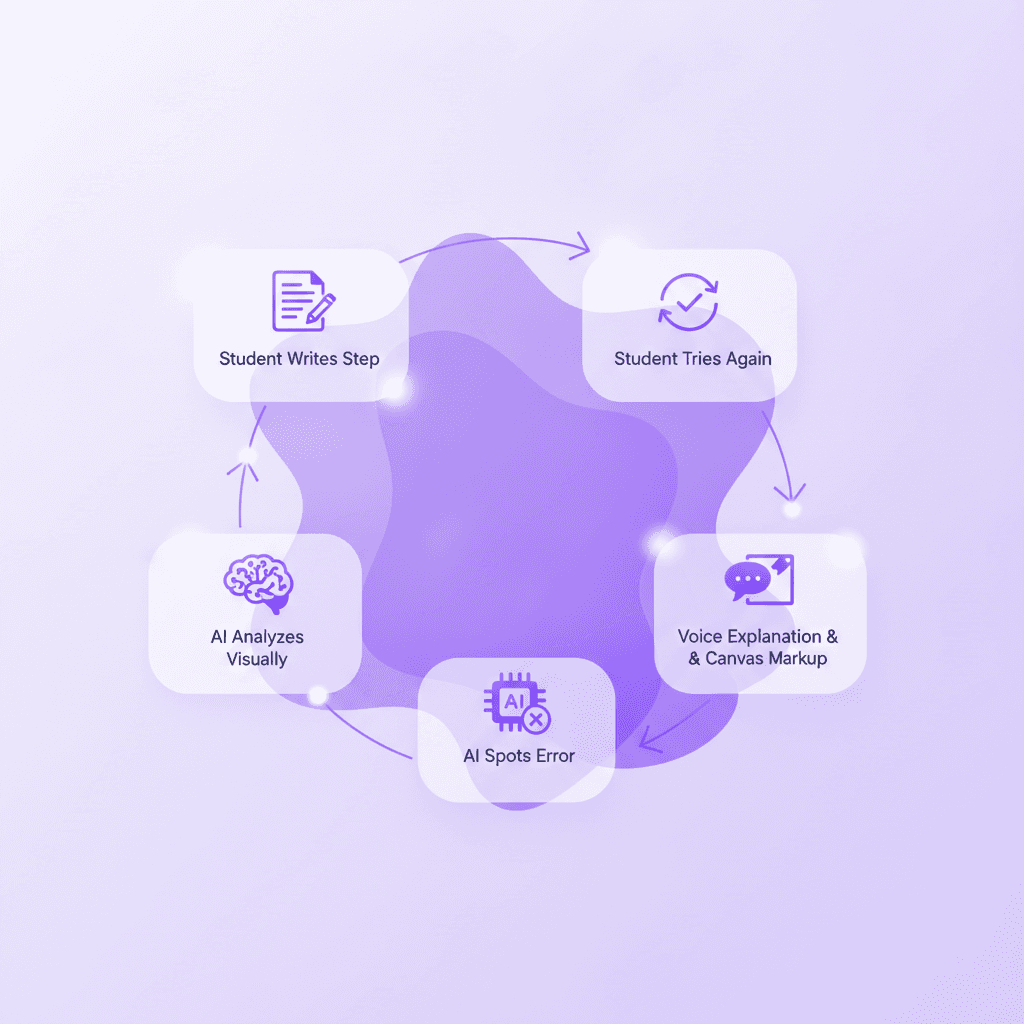
When students ask, "Can AI look at my math work?", they are looking for a system capable of optical character recognition (OCR), spatial reasoning, and pedagogical intervention. Modern visual AI tutoring platforms execute this through a three-pillar approach: visual canvas integration, real-time correction, and interactive reinforcement.
Visual Canvas Integration
The traditional method of typing complex math formulas into a chatbox using LaTeX or clunky keyboard symbols is highly inefficient for high school and college students. Visual AI tutors eliminate this friction by providing a collaborative digital workspace. You write your answer and show your steps directly on the screen. During this process, your tutor watches and waits. It analyzes spatial relationships between numbers, fractions, exponents, and variables as you draw them.
This visual intake method mirrors how a human tutor looks over a student's shoulder. By processing the problem visually, the AI understands the context of your methodology, rather than just reading a flattened line of text.
Real-Time Correction
Standard educational tools often wait until a student submits an entire worksheet before grading it. This delayed feedback loop allows students to internalize incorrect methods. A true visual AI tutor spots mistakes instantly. If you drop a negative sign in line two of a quadratic equation, the AI marks exactly where you went wrong on the canvas.
Through advanced multimodal capabilities, the AI does not simply flash a red "X." It explains what to fix using real-time voice, speaking out loud step-by-step. If you miscalculate the distribution of a variable, the AI will highlight the specific parenthesis and verbally guide you to recalculate that specific line.
Interactive Reinforcement
The pedagogical flaw of early AI was the "calculator effect"—giving away the answer instantly. Effective AI tutoring requires the student to arrive at the solution independently. After highlighting an error, the AI prompts you to try again. It keeps teaching until you actually get it right.
This continuous loop of trial, error, visual marking, and voice guidance builds genuine comprehension. Studies published by Springer indicate that immediate, targeted feedback combined with forced student reiteration increases long-term retention in STEM subjects by over 60%. By functioning as an AI that builds your study guides for you., these interactive platforms turn isolated mistakes into personalized learning paths.
Penseum vs. ChatGPT, Claude, and Khanmigo: Which Math AI is Best?
Not all AI tools are equipped to handle handwritten math problems effectively. While general Large Language Models (LLMs) are excellent at summarizing text and writing essays, they severely underperform when tasked with visual math correction.
The Limitations of General AI Models
General AI models like ChatGPT and Claude are fundamentally text-based systems. They exhibit several distinct disadvantages for math students:
* Blind to Formatting: They cannot see what you are doing. They only know what you type, meaning they miss crucial handwritten algebraic steps, spatial alignments (like long division), and geometric formatting.
* Generic Outputs: They give the same generic explanation to every student. If you ask a math question, they generate a standard textual walkthrough that may not align with how your professor taught the concept.
* One-and-Done Answers: They generate text only, providing no visual explanation, and they stop after one answer. The rest is up to you. Once the text is generated, the AI waits passively for your next prompt, failing to work the problem out collaboratively.
The Text-Based Tutor Approach
Educational aids like Khanmigo provide excellent text-based scaffolding. They are trained on solid pedagogical frameworks to prevent cheating and encourage critical thinking. However, they still lack the multimodal environment required for complex mathematics. They do not offer real-time live canvas diagramming or out-loud voice teaching tailored specifically to handwritten on-screen work.
The Penseum Advantage
By contrast, Penseum is purpose-built for multimodal STEM education. Loved by 1,600,000+ learners from top institutions, it bridges the gap between text AI and live human tutoring. It sees your actual work on the screen and responds directly to your handwriting. Furthermore, it draws diagrams and works through solutions live on your canvas.
Below is a technical comparison of how leading AI tools handle math tutoring.
Feature | Penseum | ChatGPT Plus | Claude 3.5 Sonnet | Khanmigo |
|---|---|---|---|---|
Analyzes Live Handwritten Canvas | ✅ Yes | ❌ No | ❌ No | ❌ No |
Real-Time Voice Explanations | ✅ Yes | ✅ Yes (App only) | ❌ No | ❌ No |
Draws Diagrams on Your Workspace | ✅ Yes | ❌ No | ❌ No | ❌ No |
Spots Specific Steps in Handwriting | ✅ Yes | ❌ No | ❌ No | ❌ No |
Forces Student to Rework Problem | ✅ Yes | ❌ No | ❌ No | ✅ Yes |
According to a review by student users, this visual approach is essential. A user named Jordan noted, "Penseum’s step-by-step solutions are a lifesaver! Finally, I get where I went wrong." Similarly, university students uploading dense materials—such as a user named Liam A., who uploaded Econ materials—found that Your 1-1 AI Tutor immediately identified the gaps in their procedural knowledge.
Step-by-Step Tutorial: How to Use Penseum to Find Your Math Mistakes
Transitioning from traditional studying to interactive AI tutoring requires a slight shift in workflow. Here is exactly how to set up and use a visual AI tutor to catch your math errors.
Step 1: Create Your Account and Workspace
The first step is to sign up and create your personal workspace. There is no complex setup, and you can start studying immediately. Penseum is free to use, though serious students can upgrade to a premium subscription for $29.99/month, which unlocks deeper multimodal features and extended processing capabilities.
Step 2: Show the AI Your Problem
Rather than typing a prompt like "How do I solve the quadratic formula?", you need to show the AI exactly what you are working on. You have three primary input methods:
1. Upload a Problem Set: You can upload PDFs of your homework or textbook. The Auto-Roadmap Engine will instantly scan the document and organize the concepts.
2. Type Your Question: Use standard text for simple arithmetic or definitional questions.
3. Write Directly on Your Canvas: For complex algebra, calculus, or physics, open the digital workspace. Draw your equations exactly as you would on a piece of paper. Your tutor sees exactly what you are working on in real-time.
Step 3: Learn and Get Taught—Live, Out Loud
Once the problem is on the canvas, work through the math step-by-step. Do not just wait for the AI to solve it. Write out your variables, map your geometry, and execute your calculations.
If you make an error, the AI intervenes. Your tutor explains the concept step-by-step, in real-time voice. It will highlight the exact numerical error on your screen, draw diagrams to visually represent why your calculation failed, and prompt you to correct it. It keeps going until the concept clicks.
Step 4: Study, Test, and Reinforce
After solving the immediate problem, you can instruct the AI to generate similar questions. As one student, Casey, noted, "The quizzes are spot on. Helps me prep for tests like a boss!" You can automatically convert your corrected math steps into flashcards or study guides, drastically reducing your study prep time.

Why Text-Only AI Fails at Math Tutoring
Understanding why general chatbots fail at math requires a deep dive into pedagogical psychology and mathematical processing. The fundamental issue is that mathematics is a spatial and visual language, not just a textual one.
The Spatial Barrier
Text-based AIs can't see what you're doing. They only process linear strings of characters (tokens). When you solve a system of linear equations, you are spatially organizing data—aligning variables vertically, striking through canceled terms, and moving elements across an equals sign. Text AI misses this spatial context entirely. It generates text only, meaning there is no visual explanation and no collaborative working environment.
According to cognitive research from the APA, visual-spatial working memory is heavily taxed during complex mathematical problem-solving. When a student receives a dense block of text explaining a math solution, their cognitive load maxes out. They have to mentally translate the text back into a spatial format. A visual AI tutor bypasses this cognitive bottleneck by directly altering the spatial environment (the canvas) in front of the student.
The "Instant Gratification" Trap
General models are programmed to be helpful assistants, which ironically makes them terrible tutors. Their core directive is to answer the user's prompt as efficiently as possible. If you input a math problem, they output the final answer instantly.
This short-circuits the critical thinking process. Math is not about the final number; it is about the algorithmic thinking required to get there. Because text models stop after one answer—leaving the rest up to you—they fail to build neural pathways in the student's brain.
The Need for Auditory Integration
Another area where text AI fails is multimodal integration. Reading text while trying to look at a complex math problem splits the student's visual attention.
Visual AI tutors solve this by utilizing real-time voice. Explaining a problem out loud step-by-step allows the student to keep their eyes fixed on the numbers and diagrams while receiving auditory instruction. This dual-channel processing (visual and auditory) aligns perfectly with the Mayer's Cognitive Theory of Multimedia Learning, which is frequently cited by educational institutions like Edutopia and NCTM.
Real Student Impact
The shift from text-based to visual-based AI has measurable impacts on student performance and stress levels. Medical and STEM students often face overwhelming workloads where traditional text study methods break down. Taylor, a medical student, stated, "Med school is drowning me in homework and I have tests coming up. You literally just saved the day with study material."
Furthermore, having an interactive tool creates a sense of continuous support. Stephan H., another user, remarked, "Bruh, where was Penseum when I was pulling all-nighters last semester? It's like having a study buddy who's always on, always ready."
By providing an environment where a student can write, draw, listen, and correct mistakes in real-time, visual AI tutors represent a massive leap over legacy platforms like Photomath and Mathway, which only scan for final answers without providing a live tutoring experience.
For students looking to engage deeper, there are also opportunities to join broader communities. Penseum hosts a growing community of 1,000+ learners to share feedback and ask questions, and even offers an Ambassador Program for students who want to gain startup experience and take on leadership roles on their campuses.
Frequently Asked Questions
Is Penseum free to use?
Yes, Penseum is free to use! You can sign up with no complex setup and start studying immediately. For power users who need advanced capabilities and unlimited processing, there is a premium subscription available for $29.99 per month.
Can I access visual AI tutors on my mobile device?
Yes, you can access the platform on your mobile device. This allows you to take pictures of your problem sets, view your digital canvas on the go, and review generated flashcards and study guides right from your phone or tablet.
What subjects does Penseum support?
Penseum supports a wide variety of subjects. Based on user testimonials, it is highly effective for mathematics, Economics (Econ), and even rigorous Medical School coursework. Because it acts as an AI that builds your study guides for you., it adapts to whatever study materials, PDFs, or handwritten notes you upload.
How does the AI catch my specific mistake?
The AI uses advanced computer vision to analyze your digital canvas in real time. If you make a procedural error (like factoring a polynomial incorrectly), the tutor spots it visually, marks the exact location of the error on the screen, and uses real-time voice to explain what went wrong and how to fix it before you proceed to the next step.
Sources
Related guides
Ready to study smarter?
Start turning your notes into guides, quizzes, and flashcards in seconds.
