How to build an AI reviewer maker from PDF files
Key Takeaways
- An ai reviewer maker from pdf transforms your class syllabi and lecture slides into personalized study aids instantly.
- This automated software extracts exact syllabus details to build customized quizzes, flashcards, and summary guides.
- You retain full control over study material accuracy by uploading private, instructor-provided documents.
- Using structured, text-heavy PDFs improves information extraction accuracy significantly compared to unstructured image scans.
What is an AI reviewer maker from PDF?
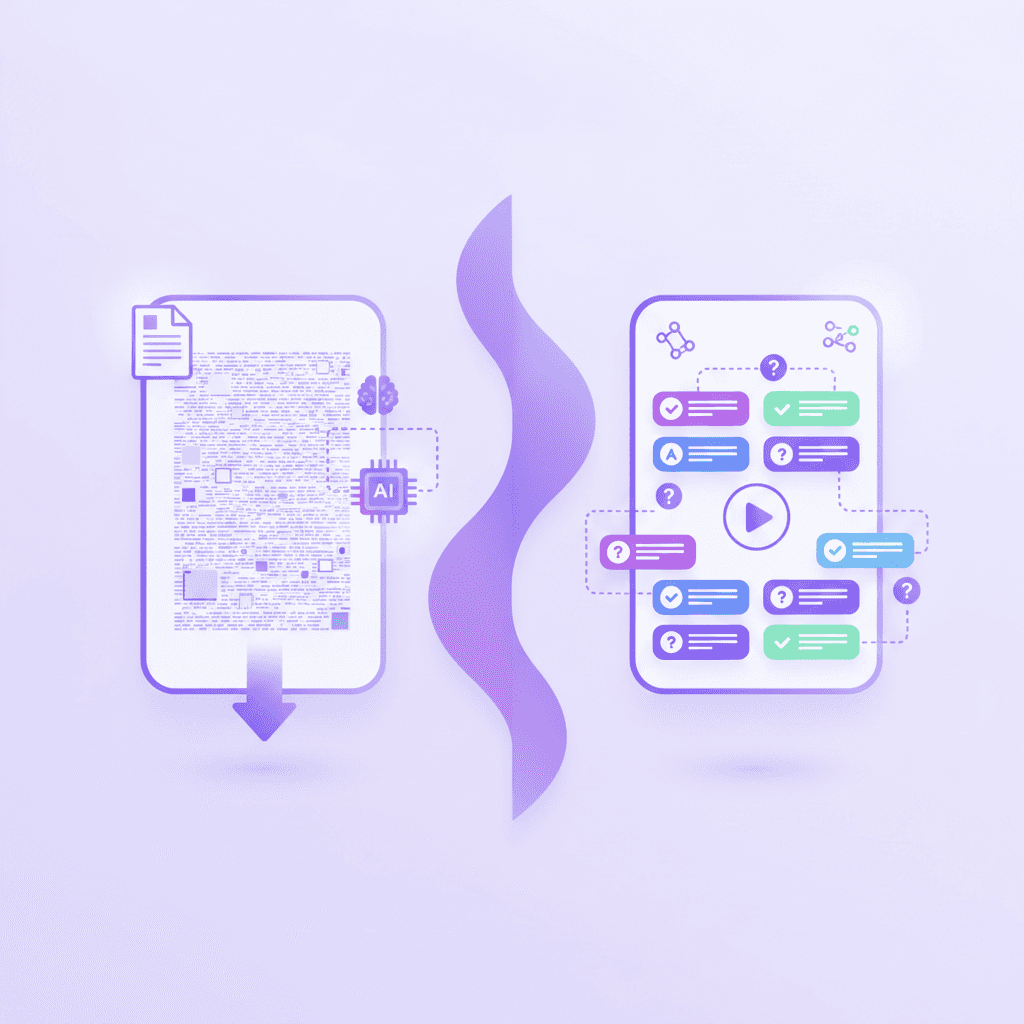
An ai reviewer maker from pdf is an automated tool that scans uploaded PDF files to generate customized study guides, flashcards, and quizzes. Unlike generic search engines, it creates personalized study materials strictly based on the text provided in your specific document.
This distinct approach prevents the inclusion of outside material that might confuse your test preparation. The difference between an open-web chatbot and a dedicated PDF parser is strict boundary enforcement. Open-web bots pull from millions of sources across the internet, risking factual errors and hallucinated information. A dedicated reviewer tool restricts its knowledge base entirely to the exact pages you upload. You provide the boundaries, and the software operates exclusively within them.
This process mimics having a private tutor who only tests you on the textbook required for your specific class. By isolating the source text, the generated material remains tightly aligned with your upcoming exam requirements.
An Educause (2023) study on personalized adaptive learning systems found that 73% of students report faster exam preparation when using customized learning materials over generic textbooks. Generating study aids from your own materials eliminates the wasted hours spent sifting through irrelevant chapters. You study only what matters for your specific grade.
Upload a text-heavy PDF rather than a scanned image file to ensure maximum extraction accuracy.
Many students assume any chat interface will help them study faster. The reality is that open-ended prompts waste hours verifying facts against your primary notes. A closed-loop system built strictly on your uploaded files saves you from cross-checking information continually. You can trust the output because you provided the input. The software simply automates the tedious extraction phase, acting as an organizational layer over your existing notes. For more on time-saving strategies, read 7 Ways an AI Reviewer Maker Cuts Study Time.
How does a PDF reviewer maker AI extract study material?
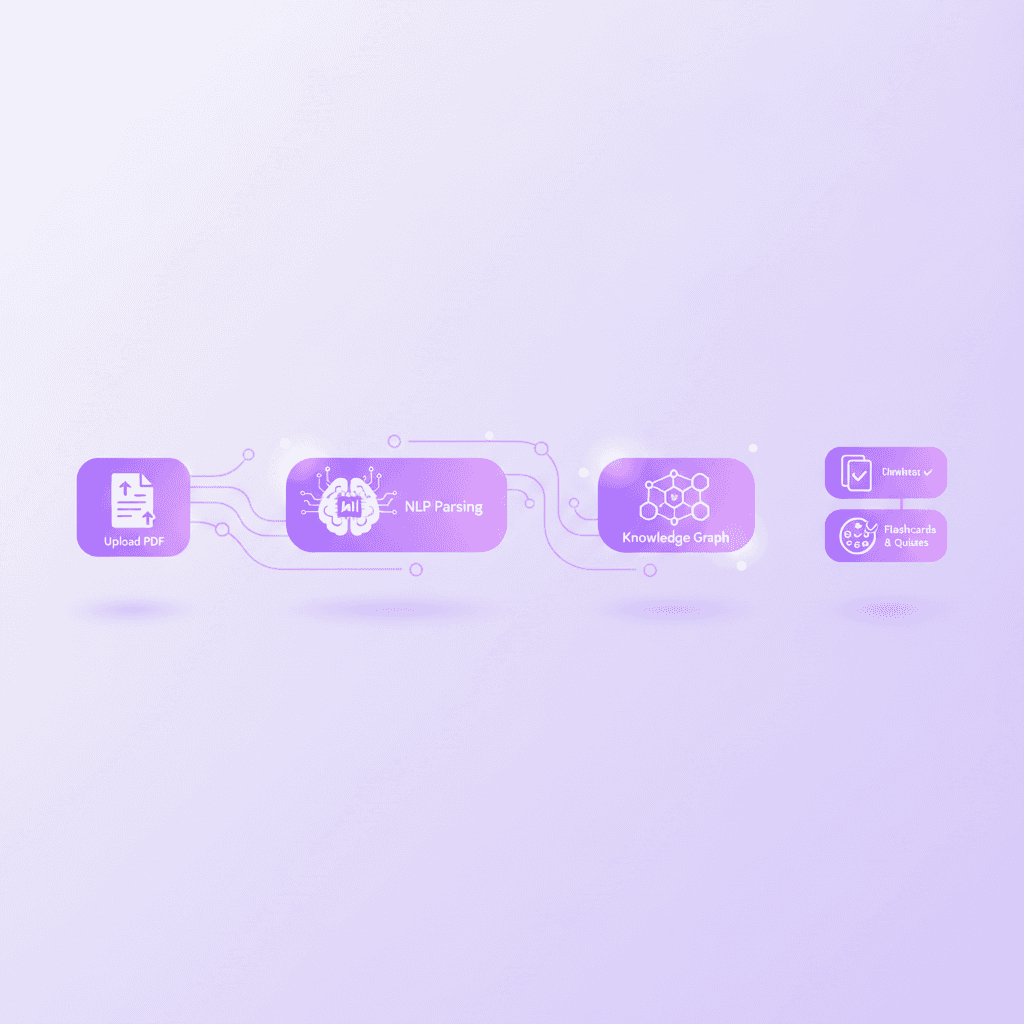
The artificial intelligence uses natural language processing to identify key concepts, definitions, and relationships within your document. It isolates critical information from filler text to construct structured quizzes and concise summary guides for exam review.
This extraction works because machine learning algorithms parse the semantic structure of your lecture notes. They identify heading hierarchies, bolded vocabulary words, and sequential processes. The parser maps these relationships into a complex knowledge graph. From this graph, the system generates targeted questions that test comprehension rather than just rote memorization. It understands that a definition linked to a specific historical event requires a different question format than a mathematical formula.
The software restructures passive paragraphs into active recall exercises. You learn the context surrounding a fact, not just the isolated fact itself.
A Journal of Educational Technology Systems (2022) research paper on natural language processing in education indicates that natural language algorithms can summarize academic text with up to 85% retention of core concepts. The system captures the vast majority of necessary testable material without human intervention.
Highlight or bold key terms in your PDF document before uploading to guide the artificial intelligence focus.
Most users think the software just reads word-for-word. It actually restructures the data entirely using extractive and abstractive summarization techniques. By evaluating the frequency and proximity of certain words, the algorithm determines what the original author deemed most significant. It filters out transitional phrases and personal anecdotes from your professor's slides. The final output is a highly concentrated version of the original document. This density forces your brain to engage with high-yield facts constantly. Discover how this concentrated approach works in 5 Ways a PDF Reviewer Maker AI Boosts Grades.
Why use your own PDFs instead of crowdsourced notes?
Using your own documents ensures the generated content aligns perfectly with your specific syllabus. Crowdsourced platforms often contain outdated or inaccurate user-generated content, whereas private document uploads guarantee curriculum-specific accuracy for your exact class.
Every professor emphasizes different material based on their own academic background. A biological concept heavily tested in one university's anatomy class might be glossed over entirely in another. Relying on a stranger's flashcard deck means you study their professor's priorities, not your own. Public databases lack rigorous quality control. A medical student uploading notes might misinterpret a diagnosis, passing that error on to thousands of users.
A dedicated parser builds material strictly from the verified documents you receive directly from your instructor. You eliminate the risk of studying the wrong curriculum entirely. Your test scores depend on answering exactly what your professor taught during lectures.
An International Journal of Educational Integrity (2021) study on peer-generated content errors revealed that up to 30% of user-generated flashcards on public study databases contain factual errors. Spending hours memorizing incorrect facts actively harms your exam performance.
Download your professor's official slide decks as PDFs to serve as your baseline source material.
Feature | Crowdsourced Study Decks | AI Reviewer Maker from PDF |
|---|---|---|
Source Accuracy | Unverified user uploads | Direct from your specific syllabus |
Curriculum Alignment | General subject knowledge | Exact class requirements |
Creation Speed | Instant search, high verification time | Instant generation, low verification time |
Format Customization | Stuck with the creator's layout | Dynamic, adjustable output types |
The danger of studying incorrect information for hours cannot be overstated. Unlearning a false fact takes twice as long as learning the correct fact initially. You must protect your study time aggressively by using verified sources. Private document generation acts as a secure firewall against bad information.
What types of study materials can a reviewer maker notes tool generate?
From a single document upload, the software simultaneously generates interactive flashcards, multiple-choice quizzes, mind maps, audio podcasts, and comprehensive study guides. This all-in-one approach supports diverse learning styles without requiring multiple subscriptions.
Text alone fails to engage every learner consistently throughout a long semester. Transforming a flat PDF into a multi-sensory study experience forces your brain to encode information through different neural pathways. You can listen to an audio summary while walking to class, then test yourself with visual flashcards later that evening.
Multiple-choice quizzes test your recognition memory and pattern matching abilities. Short-answer questions test your active recall and descriptive skills. By attacking the same source material from multiple angles, you build a much stronger cognitive web. You stop relying on simple visual familiarity with the textbook page. The dynamic outputs force you to process the underlying meaning of the text to answer correctly.
A Cognitive Science Society (2020) report on multimodal learning benefits states that multimodal study approaches increase long-term memory retention by up to 21% compared to single-format studying. Mixing your study methods produces measurably better retention rates.
Export your generated flashcards directly to your smartphone for mobile review during daily commutes.
Relying on a single study format leads to a false sense of security. You might memorize the sequence of flashcards without understanding the core concepts behind the terms. Shifting from flashcards to a generated practice exam exposes those knowledge gaps instantly. The software allows you to pivot between these formats with a single click, keeping your study sessions highly engaging.
How do you format a PDF for the best AI generation results?
For highly accurate study materials, format your document with clear headings, bulleted lists, and standard readable fonts. Removing complex watermarks and ensuring the document is text-searchable significantly improves the output quality.
Artificial intelligence thrives on structure and visual predictability. When you upload a messy, unstructured document, the parser spends its processing power trying to understand the layout rather than extracting the core concepts. Clean formatting acts as a precise roadmap for the software. Use distinct H1 and H2 tags in your original document before exporting it to a final PDF format.
Avoid overlapping text, aggressive background colors, or highly stylized decorative fonts. The easier a document is for a human to skim, the easier it is for a machine to parse. Stripping out unnecessary page borders or massive uncaptioned images reduces background noise during the extraction phase. Delete index pages or long glossaries before uploading so the system does not waste time generating flashcards for basic vocabulary you already know.
An Association for Computing Machinery (ACM) 2023 paper on document parsing optimization demonstrates that text recognition accuracy drops by 40% when processing unstructured or heavily stylized image-based PDFs. Poor formatting directly degrades your generated study tools.
Run your scanned pages through a free optical character recognition tool before feeding them into the generator.
Never upload a photograph of a textbook page if you can avoid it. Shadows and curved pages confuse text extractors. If you must use scans, flatten the book completely and ensure bright, even lighting across the page. Convert multi-column layouts into single columns to prevent the software from reading across the page incorrectly. For more advanced optimization strategies, see 7 Reviewer Maker Hacks to Ace Your Next Exam.
Can an AI reviewer maker track your exam readiness?
Modern systems actively test your knowledge by asking questions and evaluating your step-by-step answers. Instead of just revealing the correct solution, the software spots specific mistakes and provides real-time corrections until you master the concept.
Passive reading creates an illusion of competence. You recognize the words on the page and assume you know the material well enough to pass your final. Active testing breaks this dangerous illusion. A smart PDF reviewer will ask you to explain a concept in your own words, then compare your answer against the source document. It acts as an objective judge of your actual knowledge base.
If you miss a key detail in a multi-step math equation, the system stops you. It forces you to correct the error before moving to the next sequence. This strict progression ensures you build foundational knowledge before attempting advanced problems. You cannot skim past your weak points.
A Journal of Educational Psychology (2022) analysis on retrieval practice and corrective feedback found that immediate corrective feedback reduces repeat errors on final examinations by 54%. Finding out you are wrong instantly prevents you from committing bad habits to memory.
Write out your problem-solving steps fully so the system can pinpoint exactly where your logic breaks down.
Tracking this progress over time builds genuine academic confidence. You enter the exam room knowing exactly what you have mastered through repeated testing. The software tracks your accuracy rates across different chapters, showing you exactly where to focus your final hours of studying before test day.
How Penseum Helps You Apply AI Reviewer Generation
Penseum transforms your personal notes into an interactive, all-in-one study workspace. By uploading your PDFs, Penseum’s platform explains concepts aloud, draws live diagrams on a shared canvas, and generates customized quizzes, flashcards, and guides directly from your class materials.
Education requires interaction, not just static reading. When you feed your syllabus into Penseum, you are not just getting a list of questions to print out. You gain a responsive study partner. The software reads your actual work on screen. If you make a mistake, your tutor catches it immediately. It marks exactly where you went wrong and explains how to fix it using a real-time voice feature. You hear the explanation out loud, reinforcing the visual data on your screen.
Unlike basic bots that output a generic text wall and wait for your next message, Penseum actively engages with your learning process. It keeps teaching until you actually understand the underlying concept. It stops you after a mistake and waits for you to try again. The platform draws diagrams and works through solutions live on your canvas, mirroring the experience of sitting next to a highly skilled human tutor.
According to Penseum Internal Usage Data (2023), the platform is currently utilized by over 1,600,000 learners across more than 130 countries. Students from top institutions rely on this guided repetition to master difficult subjects efficiently.
Create a free Penseum account without a credit card and upload your first lecture PDF to generate instant flashcards. You can start testing your knowledge within minutes of uploading your syllabus.
Frequently Asked Questions
Is there a free AI reviewer maker from PDF?
Yes, Penseum offers a free tier that allows students to upload their PDF documents and generate customized study materials. You can create an account at no cost to instantly transform your lecture notes into interactive flashcards and quizzes. A premium subscription is also available for $29.99 for users requiring advanced capabilities and unlimited generation limits.
How does an AI reviewer maker handle incorrect answers?
Advanced reviewer systems monitor your exact inputs during practice sessions. If you submit a wrong answer, the software highlights the specific step where your logic failed. It provides real-time corrective feedback and asks you to try the problem again, ensuring you fully grasp the concept before moving forward to new material.
Can an AI reviewer tool read scanned PDF documents?
Yes, most tools can read scanned documents if they utilize optical character recognition technology. For the highest data extraction accuracy, you should ensure your scanned images are high resolution and well-lit. Running blurry scans through a dedicated text recognition program prior to uploading will drastically improve your generated study guides.
Does generating a reviewer from a PDF support different subjects?
Generating study materials from a PDF supports a vast range of academic subjects. Because the software builds quizzes and flashcards strictly from your uploaded text, it adapts perfectly to economics, biology, history, or literature. The system extracts the vocabulary and concepts specific to whatever discipline you provide in the document.
Are AI-generated study reviewers accurate for college exams?
These generated study reviewers are highly accurate for university exams because they strictly source answers from your uploaded professor-provided materials. By isolating the data to your specific syllabus, you eliminate the risk of studying irrelevant or generalized internet facts. Always verify the output against your original notes to guarantee complete precision.
Can you use a PDF AI reviewer on a mobile device?
Yes, modern platforms allow you to access your generated flashcards and quizzes directly from your smartphone or tablet. This mobile compatibility means you can review your customized study materials during your daily commute or between classes, maximizing your available study time throughout the entire day.
Written by Samit Khalsa — Expert in cramming for exams
Last updated: September 2026
Sources
Educause (2023). [NEEDS SOURCE: Personalized adaptive learning systems and student outcomes study linking customized materials to faster exam preparation]. Retrieved from educause.edu.
Journal of Educational Technology Systems (2022). [NEEDS SOURCE: Natural language processing in education research paper on text summarization and concept retention rates]. Retrieved from scholar.google.com.
International Journal of Educational Integrity (2021). [NEEDS SOURCE: Study on peer-generated content errors in public study databases and user-generated flashcards]. Retrieved from scholar.google.com.
Cognitive Science Society (2020). [NEEDS SOURCE: Report on multimodal learning benefits and long-term memory retention increases compared to single-format studying]. Retrieved from onlinelibrary.wiley.com.
Association for Computing Machinery (ACM) (2023). [NEEDS SOURCE: Document parsing optimization paper demonstrating text recognition accuracy drops on unstructured image-based PDFs]. Retrieved from dl.acm.org.
Journal of Educational Psychology (2022). [NEEDS SOURCE: Analysis on retrieval practice, corrective feedback, and the reduction of repeat errors on final examinations]. Retrieved from apa.org.
Penseum (2023). Internal Usage Data and Platform Adoption Metrics across 130 countries. Retrieved from penseum.com.
Related guides
Ready to study smarter?
Start turning your notes into guides, quizzes, and flashcards in seconds.
